
ebgp.addRsPeer(100, 150)
ebgp.addRsPeers(100, [150, 151])
The Ebgp::addRsPeer and Ebgp::addRsPeers calls take two parameters; the first is an internet
exchange ID, and the second is ASN or a list of ASNs.
They will configure the peering between the
given ASN(s) and the given internet exchange’s route server (i.e., setting up
Multi-Lateral Peering Agreement (MLPA)). Note that the session with RS will
always be Peer relationship.
The eBGP layer sets up peering by looking for the router node of the given
autonomous system from within the internet exchange network. So as long as
there is a router of that AS in the exchange network (i.e., joined the IX with
joinNetwork() API), the eBGP layer should be able to set up the peeing.
# Create a private peering between AS150 and AS151 inside IX100
ebgp.addPrivatePeering(100, 150, 151, abRelationship = PeerRelationship.Provider)
The Ebgp::addPrivatePeering call takes four parameters; internet exchange ID,
first ASN, the second ASN, and the relationship. The relationship parameter
defaults to Peer. The call will configure peering between the two given ASNs
in the given exchange.
The peering relationship can be one of the followings:
PeerRelationship.Provider: The first ASN is considered as the upstream
provider of the second ASN. The first ASN will export all routes to the
second ASN, and the second ASN will only export its customers’ and its own
prefixes to the first ASN. In this type of peering, the second AS is considered
as the customer of the first one, and the routes coming from the second AS
will be marked as the customer routes.
PeerRelationship.Peer: The two ASNs are considered as peers. Both sides
will only export their customers and their own prefixes. However, when A exports
its routes to B through this type of peering, B will not mark A’s routes
as its customer routers, and therefore will not further export them to
another peer C, unless B and C peers using the Unfiltered type (see the following item).
PeerRelationship.Unfiltered: Make both sides export all routes to each other.
The eBGP layer sets up peering by looking for the router node of the given
autonomous system from within the internet exchange network. So as long as
there is a router of that AS in the exchange network (i.e., joined the IX with
as15X_router.joinNetworkByName('ix100')), the eBGP layer should be able to
setup peeing just fine.
The following diagram helps explain how routes are exported for three types of peering. The diagram shows how the AS150 export its routes to its peers of various types,
including upsteam providers (AS150 is on the customized side of a PeerRelationship.Provider peering),
downstream customers (AS151 is on the provider side), PeerRelationship.Peer peers,
and PeerRelationship.Unfiltered peers.
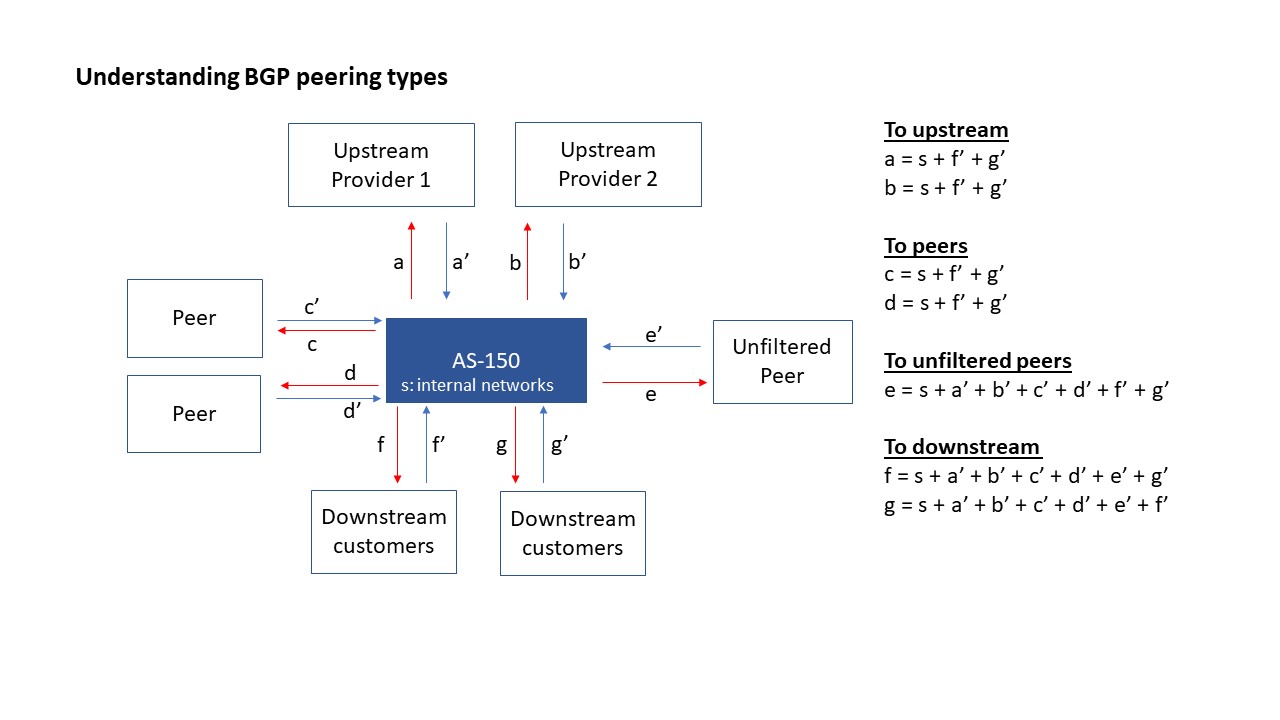
We show how to allow the nodes inside an emulator to communicate
with the machines on the real Internet. A complete example
can be found here.
To achieve this goal, we first need to create
a BGP router to announce the real-world network
prefixes inside the emulator, so the packets going to the
real Internet can be routed to this BGP router.
The routing on this router is set up specially, so packets
going to the real Internet can be routed out (via NAT).
Responses from the outside will come back to this router
and be routed to the final destination in the emulator.
The following example shows how to create a real-world
router to connect the emulated world with the real world.
autosys = base.createAutonomousSystem(11872)
router = autosys.createRealWorldRouter(name='real-world')
router.joinNetwork('ix101', address = '10.101.0.118')
The createRealWorldRouter() API takes three parameters:
name: name of the node.hideHops: enable “hide hops” feature. When True, the router will hide real
world hops from traceroute. This works by setting TTL = 64 to all real world
destinations on POSTROUTING. Default to True.prefixes: list of prefix or None (default).When the prefixes is set to None (default), the router will automatically
fetch the list of prefixes announced by the autonomous system in the real world.
In the example above, 11872 belongs to the Syracuse University, so
this BGP router will announce the network prefixes belonging to the
Syracuse University (128.230.0.0/16). Other networks are not
reachable from this BGP router.
If we want to create a BGP router that can reach all the nodes on the Internet, we can provide the following IP prefixes, which covers the entire IPV4 space, i.e., this BGP router will announce to the emulator that it can reach the entire Internet.
autosys.createRealWorldRouter(name='real-world', prefixes=['0.0.0.0/1', '128.0.0.0/1'])